Incentive Compensation Starter

For Oracle Fusion ICM implementation partners

Make Fusion compensation easier to understand and act on.

A customer-branded Visual Builder app for sellers, partners, managers and administrators. Bring payout summaries, progress, reviews and exceptions into focused workspaces on desktop and mobile. Delivered as 32 pages in English and Spanish, with an optional driver module. Import it, apply your customer's brand and connect the required Fusion and service integrations. One firm buys it once, and the code is assigned to that firm in writing.

No sign-in. Sample data. Switch roles from the top bar. Live Fusion validation remains part of buyer diligence.

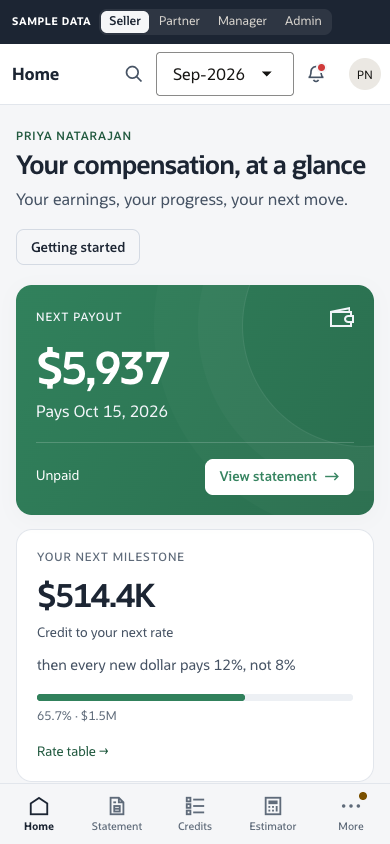
Seller home: next payout, earnings, progress to the next rate and a comparison with the previous period
The same seller home on a phone
Pages
32 +3 optional driver pages
Roles
4 + optional driver
Languages
2 EN / ES
Services
4 reference services

Seller 8 pages · Partner 5 · Manager 8 · Admin 11 · optional Driver 3 · every page in English and Spanish

What you get

The app, the integration, the handoff pack.

Sold once, to one firm. The source code is assigned outright to a single buyer under a written agreement, and it is not resold. No subscription, per-seat fee or renewal. Delivered as-is, with no support or updates. One fixed fee: US$120,000. The code is assigned on final payment.

Best fit: partners delivering Fusion ICM self-service. Not a fit if you need managed SaaS.

  • 32 responsive pages across four roles, in English and Spanish
  • Branding preview for workspace name, logo and colour; export configuration for deployment
  • VBCS and Oracle JET source with Fusion ICM and HCM reads and actions scoped to the signed-in user
  • Four Node.js reference services you host: disputes, estimation, analytics, notifications
  • Tenant setup and diagnostics: enter tenant URLs, branding and display mappings, then generate a configured VBCS import ZIP locally from the supplied buyer package
  • Fusion-configured import ZIP with authentication enabled, plus implementation checklist, pod-readiness check, acceptance tests and promotion guidance
  • Automated checks for service contracts, application logic, schemas, syntax and responsive browser behavior; run without a Fusion pod
  • Optional Fusion/OIC scale contracts for bounded summaries, paged team views and background paysheet jobs; activation required

The everyday experience

Built around the questions people need answered.

Fusion remains the system of record. These workspaces bring the relevant result, context and next action together.

Understand the payout

Inspect a reported earning’s input, output, credit, rate-table value, tier count, currency and posting status. The view preserves Fusion’s reported values; it does not infer a formula or payment confirmation.

Review with context

Managers see team priorities and review the selected paysheet’s refreshed total alongside its paged payment records, including held lines. Dispute review keeps the original claim separate from explicitly linked source records; missing or denied evidence stays unverified.

Use it at any width

One navigation mode at a time: an icon sidebar on desktop, bottom tabs on phones and tablets. Narrow screens use labelled Team rows instead of squeezed columns.

Make it the customer’s

Preview the workspace name, uploaded logo and brand colour before exporting configuration. Neutral navigation keeps the brand distinct from warning and status colours.

The 26C evidence comparison and decision brief summarizes documented Oracle capabilities, current record-review behavior and open validation needs. It reports no matched live task comparison. Included getting-started help provides role-specific starting links and terminology. It can be disabled for customers using Oracle Guided Learning; OGL licensing and setup remain separate.

How delivery runs

From import to UAT in three phases.

The order of work. Timing depends on your team and the customer's pod, so we don't quote days. Building this yourself means 32 pages, four roles, two languages, four service contracts and the tests behind them, before the customer-specific work starts. The source provides that foundation; your delivery team still owns the customer mappings, integrations, security and UAT.

01

Configure and connect

Enter the customer's tenant details and generate a configured import ZIP. Import it into Visual Builder, authorize customer backends and identity, map IAM groups to roles, then run the pod-readiness check. The setup form prepares configuration; Oracle authorization and workflow integration remain implementation steps.

02

Build the services

Attainment feed behind a REST service, disputes and estimation, notifications and custom wiring.

03

UAT with real sellers

Acceptance runs and fixes with the customer's people.

Try it in three minutes

A focused workspace for each role.

Pick a role and try the task on each card. Everything is sample data.

Seller statement with an earning evidence drawer showing reported inputs, output, amount and status

Seller

Inspects an earning record

Open an earning from the statement to review its reported inputs, output, amount and status. The drawer shows source values without inferring a rate formula.

Try: open the statement, then open an earning. Open as Seller (opens in a new tab)

Manager paysheet review drawer showing the current total and its payment records

Manager

Reviews a paysheet with its records

Open a selected paysheet to see its refreshed current total alongside its payment records, including held lines, before confirming the intended approval.

Try: open Paysheets, choose one, then select Review to inspect its current total and payment records. Open as Manager (opens in a new tab)

Administrator dispute queue showing amounts at stake, status filters and case actions

Administrator

Works the exception

Processing status and exceptions, plus a dispute queue with age filters, financial summaries, sorting and compact rows.

Try: resolve a few disputes at once. Open as Admin (opens in a new tab)

Know before you buy

A clear boundary between the experience and the implementation.

Your delivery still owns

Customer credentials, IAM setup, DFF meaning, eligibility rules, security review, performance validation and UAT.

Stand-in in the demo

The deal estimator runs on sample logic, not a live Fusion call.

Live validation

The demo uses samples. Fusion mappings, native dispute workflow operations, attachment forwarding and performance still need implementation or validation on the customer’s pod.

Large teams

The default profile retains a 5,000-report manager guard. Optional Fusion/OIC contracts provide bounded summaries and paged team views, but require backend implementation, activation and customer-volume testing.

For your security review: Fusion reads and actions run as the signed-in user (OAuth user assertion), not a shared account. Business data comes from Fusion or a configured Fusion-backed service; the browser keeps only a theme preference and the last five global-search picks, which can include names and amounts.

Seen enough? Ask for the assignment terms.

One buyer, one fixed fee: US$120,000. The code is assigned outright to a single firm and is not offered to anyone else. Email for the agreement and the known-gaps list. Questions before you buy are welcome.